Does your company run on code that hasn't been updated in quite some time? Maybe you think to yourself, 'If it ain't broke, don't fix it.' After all, it still works. It does the job. No one's complaining.
Plus, your team relies on it for everyday operations, and building new features is an endeavor that takes time, money, and planning.
But aging frameworks, unsupported dependencies, and outdated tech can make even routine maintenance risky, and although it may function, it certainly feels outdated and clunky compared to the more modern applications your competitors are using.
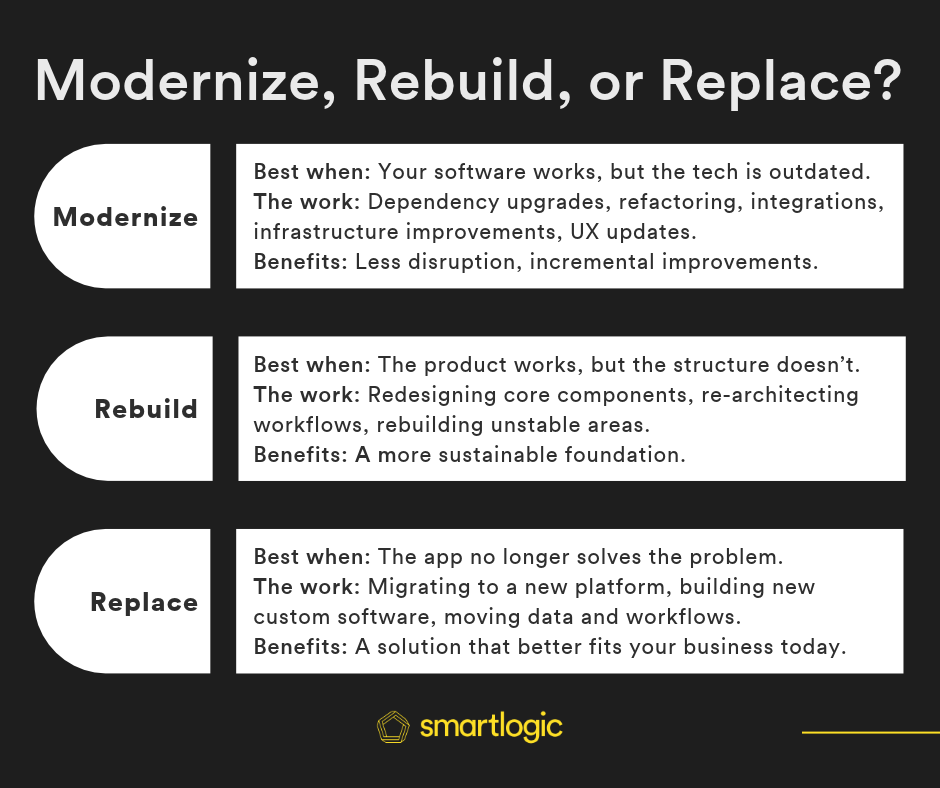
You already know your software is old. The question is... what should you do about it? You could modernize the application you already have. You could rebuild substantial parts of it on a new foundation. Or you could replace it altogether.
To make the appropriate changes, you need to choose the correct path to solve the problems you're facing. That's where legacy application modernization comes into the conversation.
Let's explore your options and see which solution makes the most sense for your needs.
"Legacy" doesn't always mean "obsolete"
The term "legacy" can make your application sound like an ancient artifact. But "old" isn't synonymous with "bad."
In fact, your app probably contains years of business logic, workflows, integrations, and data. Your staff knows exactly how to use it. Your customers depend on it. Parts of the system work perfectly. It just needs some improvements to support the way your organization works today and integrate into the current technological ecosystem.
If you're trying to determine whether or not your software is at this point, read Signs It's Time to Upgrade Your Business Software, which looks at some of the common warning signs including scalability, integrations, security, and performance.
What is legacy application modernization?
Legacy application modernization means updating your existing software to make it easier to maintain, improve, and scale without rebuilding the entire application.
What does that actually look like? It depends on what's causing problems with your current system.
For example:
- Your software is running on outdated technology. We might upgrade an older version of Ruby on Rails, replace unsupported libraries, and update the application's dependencies so your team can continue developing and maintaining it safely.
- Your application struggles as your business grows. We might identify slow database queries, improve how the application processes large amounts of data, or update its infrastructure to better handle increased traffic and usage.
- Your software doesn't work well with newer tools. We might build APIs or update existing integrations so your application can exchange information with your CRM, payment processor, reporting tools, or other services.
- Making small changes takes too much time. We might refactor complicated code, separate tightly connected components, and add automated tests so developers can make improvements without worrying about breaking unrelated features.
- Your software feels outdated to the people using it. We might redesign confusing forms, simplify multi-step processes, or improve dashboards and reporting so employees and customers can get things done more easily.
In each case, we're addressing a specific problem rather than assuming the entire application needs to be replaced.
The goal is to preserve the functionality your organization still relies on while making the software easier to maintain, more reliable, and better equipped to support what comes next.
Rebuild when the product is right but the structure isn't
Sometimes, upgrading parts of an existing application won't be enough to solve the underlying problems.
Your software might still serve an important purpose, but the way it was originally built makes it difficult to support the features, integrations, or volume of users your business needs today.
For example:
- Your application can't support the way your business has grown. Maybe it was originally built for a few dozen employees, but now hundreds of people rely on it across multiple locations. If the underlying architecture can't support that growth, rebuilding core components may make more sense than continually patching performance issues.
- Your software is too interconnected to change safely. Updating your billing system unexpectedly breaks customer reporting, or changing one workflow affects several others. If the application's components are so tightly connected that every improvement creates new problems, rebuilding parts of the architecture could make future development more manageable.
- Your business has outgrown the application's original design. Your software was built around one service or product, but now your organization offers several. Adding more features to the existing structure might create increasingly complicated workarounds instead of supporting how your business actually operates.
- Your application's technology creates fundamental limitations. An older framework or architecture can't reasonably support the functionality you need, and upgrading individual components would require so much additional work that rebuilding becomes the more practical investment.
Rebuilding doesn't necessarily mean recreating every feature or starting from a blank slate.
We can preserve your existing business logic, valuable workflows, and important data while rebuilding the parts of the application that are holding you back.
The goal is to create a more sustainable foundation without losing everything your organization has learned from using the software over the years.
Replace when the application itself is no longer the right solution
Sometimes, it doesn't make sense to keep investing in your existing application.
Your business may have changed significantly since the software was originally developed, or newer technology may offer a simpler, more cost-effective way to accomplish the same goals.
For example:
- Your organization no longer needs custom software for a particular function. Maybe you built an internal scheduling or customer management system years ago because there wasn't a product that met your needs. Today, an established software platform might handle those same workflows without the ongoing cost of maintaining a custom application.
- Your business processes have fundamentally changed. Maybe the application was designed around how your company operated ten years ago, but your services, customers, and internal workflows look completely different today. Adapting the existing software might require more effort than choosing a solution designed around your current needs.
- Maintaining the application costs more than the value it provides. Maybe you're paying for specialized developers, outdated infrastructure, and constant maintenance just to keep a relatively simple system running. A supported alternative could reduce that ongoing burden.
Replacing software isn't necessarily easier than modernizing it. You'll still need to migrate important data, account for existing integrations, and help your team adjust to new workflows.
But if the application no longer solves the right problem, investing more money into the existing codebase may not be the best use of your resources.
The question isn't how much you've already invested in your software. It's whether that software is still the right investment for your future.
Which parts of your existing software are worth keeping?
Before deciding whether to modernize, rebuild, or replace your application, you need to understand what you're working with.
That means looking beyond the codebase and identifying which parts of the software are still valuable to your business.
Start by asking a few questions:
- Which workflows does your team rely on every day? Identify the processes that would be difficult to recreate or replace, particularly those involving multiple departments, systems, or people.
- What functionality is unique to your business? Your application may contain custom reporting, approval processes, or business rules that an off-the-shelf replacement wouldn't support without significant customization.
- What would happen if the application went offline tomorrow? Consider which operations would stop, what information would become inaccessible, and which customers or employees would be affected.
- Which features are no longer useful? Just because something was important when the application was built doesn't mean it still needs to be maintained or recreated.
Talk to the people who use the software every day, as well as the developers responsible for maintaining it. They'll often have very different perspectives on what's working and what needs to change.
Understanding what to preserve (and what you can let go of) will help you make a more informed decision about how much of the application actually needs to change.
Considering costs when modernizing legacy software
The cost of a legacy application modernization project depends on the condition of your existing software, the changes you want to make, and how much of the current application you plan to keep.
But the initial development cost isn't the only thing worth considering.
For example, an off-the-shelf replacement might look less expensive than modernizing your custom application. But what happens when you factor in migrating your data, rebuilding integrations, training employees, and potentially changing established workflows?
A complete rebuild may give you a cleaner technical foundation, but it also means investing time in recreating business logic and functionality your existing application already handles.
And while smaller modernization projects may cost less upfront, continuing to patch an application with fundamental architectural problems can become expensive over time.
There's also the cost of doing nothing. If your developers are spending most of their time fixing problems instead of building useful features, or your employees rely on manual workarounds because the software can't support their workflows, those costs add up.
Before choosing an approach, consider both the initial investment and what it will cost to maintain, support, and improve the application over the next several years.
Legacy application modernization doesn't have to happen all at once
Once you've decided what needs to change, you don't necessarily have to tackle everything in one large project.
At SmartLogic, we often approach modernization incrementally, making targeted improvements while keeping the existing application operational.
That process typically starts with reviewing the codebase, dependencies, infrastructure, and the workflows your team relies on. From there, we can identify the most important problems, prioritize improvements, and develop a plan that accounts for your budget and operational needs.
Instead of replacing an entire application at once, we might upgrade outdated dependencies first, refactor a particularly complicated part of the codebase, or move specific functionality to a more sustainable architecture.
Each stage gives us an opportunity to test changes, confirm that existing functionality still works, and adjust the plan as we learn more about the application.
We've taken this approach with an older Ruby on Rails application, where our team worked through an aging frontend stack and planned updates across dependencies and components without treating the entire application as a rewrite.
Read how we approached modernizing a legacy Rails application
Not every application can be modernized incrementally, and some changes require a larger restructuring effort. But understanding what can be improved in stages can help reduce disruption and make the overall project more manageable.
Not sure what your application needs?
Deciding whether to modernize, rebuild, or replace your software isn't always straightforward, especially when your business relies on the application every day.
You don't need to have the answer before talking to a development team.
At SmartLogic, we help organizations assess their existing applications, identify what's holding them back, and determine which improvements are worth making.
Learn more about our legacy application modernization services, or tell us a little about your software and what you'd like to improve. We can start there.